



Can you guess, what users see every time they land on a website?
They typically see the overall layout and design of the page.
But, the most important thing they care about is the speed of the page.
And what happens when they keep waiting for the elements to load?
They lose hope and leave the site; thus, their user experience is lost.
To solve the issue, you don’t have to go anywhere else. The solution is here. Just follow this guide.
What is Next3 Offload?
Next3 Offload is an all-in-one WordPress media offloading plugin.
It compresses and offloads media library files to the cloud like Amazon S3, Bunny Storage, Wasabi Cloud, DigitalOcean, MinIO, IDrive e2, StackPath, Cloudflare R2, UpCloud, and other S3-compatible object storage and CDNs.
It also has a function to bulk convert different kinds of image formats like PNG and JPEG into WebP and rewrite media URLs once you offload images to the cloud.
This plugin is useful for WordPress users with blogging, photography, restaurants, e-commerce, video streaming, news outlets, and lifestyle blog websites.
Next3 Offload is also a good choice for web development agencies and freelancers who manage client websites.
What Makes Next3 Offload Awesome?
Quick and Easy Offloading
No worries about your space. Next3 Offload boosts your site performance and frees up your server space and cost by offloading WordPress media library files to the cloud.
Automatic Media URL Rewrite
This plugin automatically rewrites URLs of your offloaded media library files. Your website will run smoothly, no extra effort is needed.
Integration with Top Cloud Storage Providers
This plugin smoothly works with 20+ various cloud storage providers, including Amazon S3, DigitalOcean, Bunny Storage, Cloudflare R2, Backblaze B2, Wasabi Cloud, and other S3-compatible storage.
Clean Up Server Space
Next3 Offload enables you to free up your website’s storage and maintain server costs by offloading media library files to the cloud
Cloud Storage Migration Made Easy
Want to switch cloud providers? No worries at all. You can easily move all your files from one cloud storage provider to your preferred cloud platform with just a single click.
Optimize CSS & JS Files
Next3 Offload minifies and offloads your CSS and JS files, ensuring faster website load times and smooth user experiences.
Smarter Image Optimization & WebP Support
This plugin compresses your site’s images and bulk converts them to WebP format. As a result, your images load faster than ever before.
Automated Database Cleanup
Next3 Offload’s automated weekly cleanup feature helps you clean up unnecessary data like old pages, posts, comments, and expired transients. As a result, your site loads faster.
Easy Installation and Setup
Step 1: Install the Plugin
First of all, you need to download the plugin from the website themedev.net. You will receive a .zip file containing the plugin after you buy that. Then install and activate the plugin on your site.
Install the plugin via WordPress Dashboard
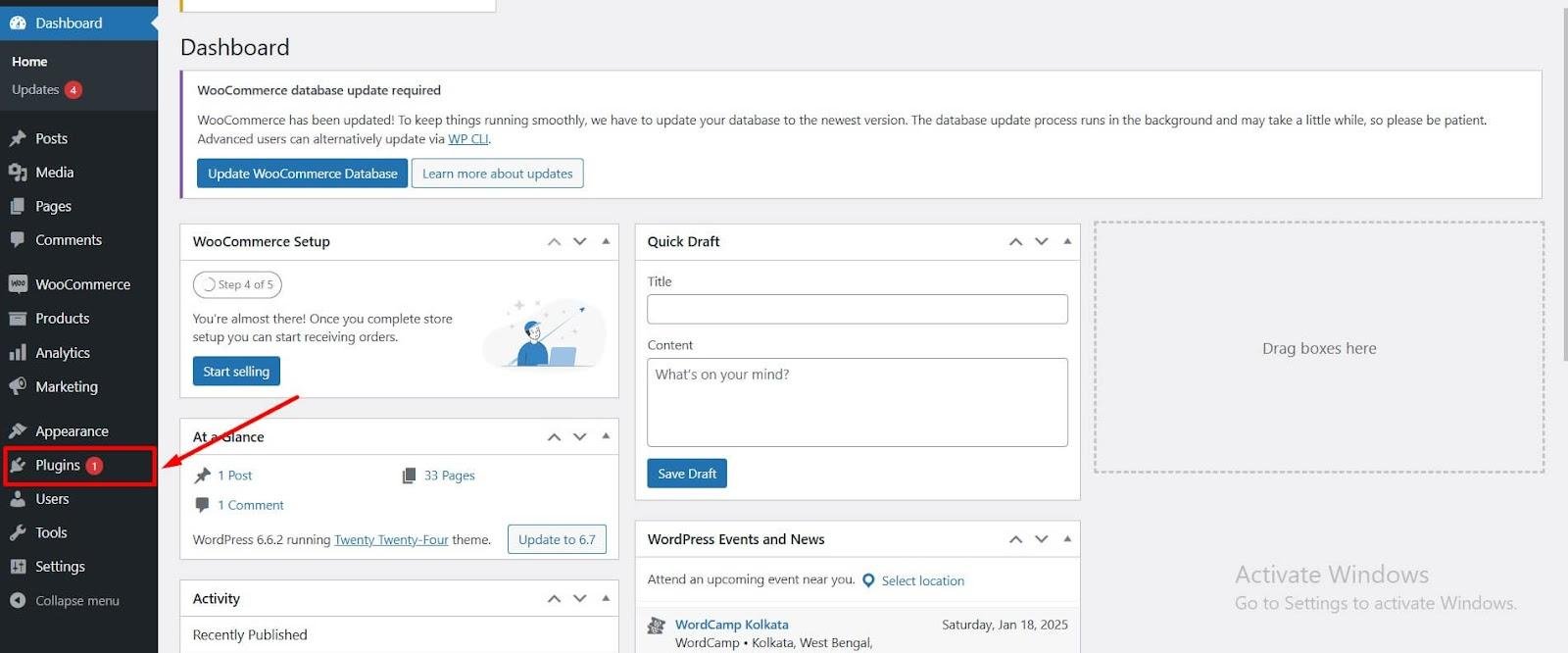
Log in to your WordPress admin dashboard.
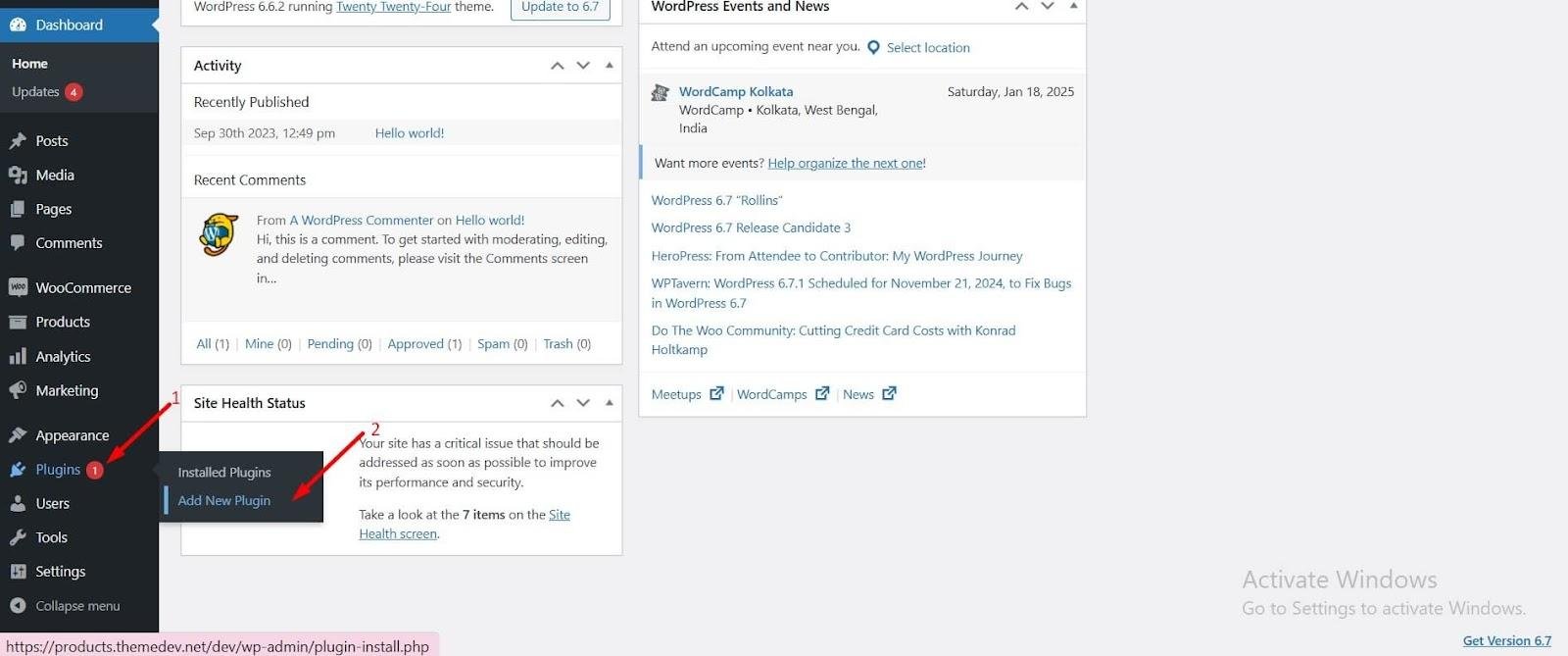
Navigate to Plugins > Add New.
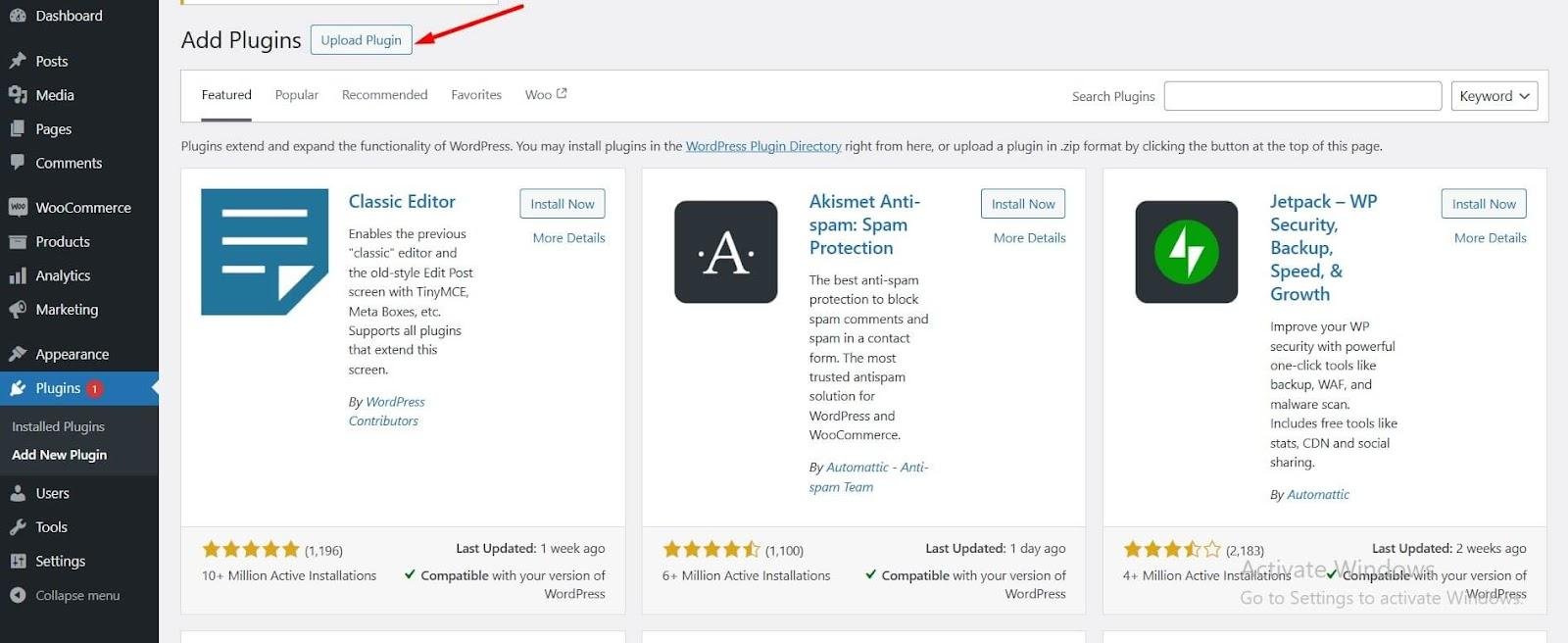
Click on the Upload Plugin button at the top of the page.
Then click to choose File, then select the .zip file you downloaded.
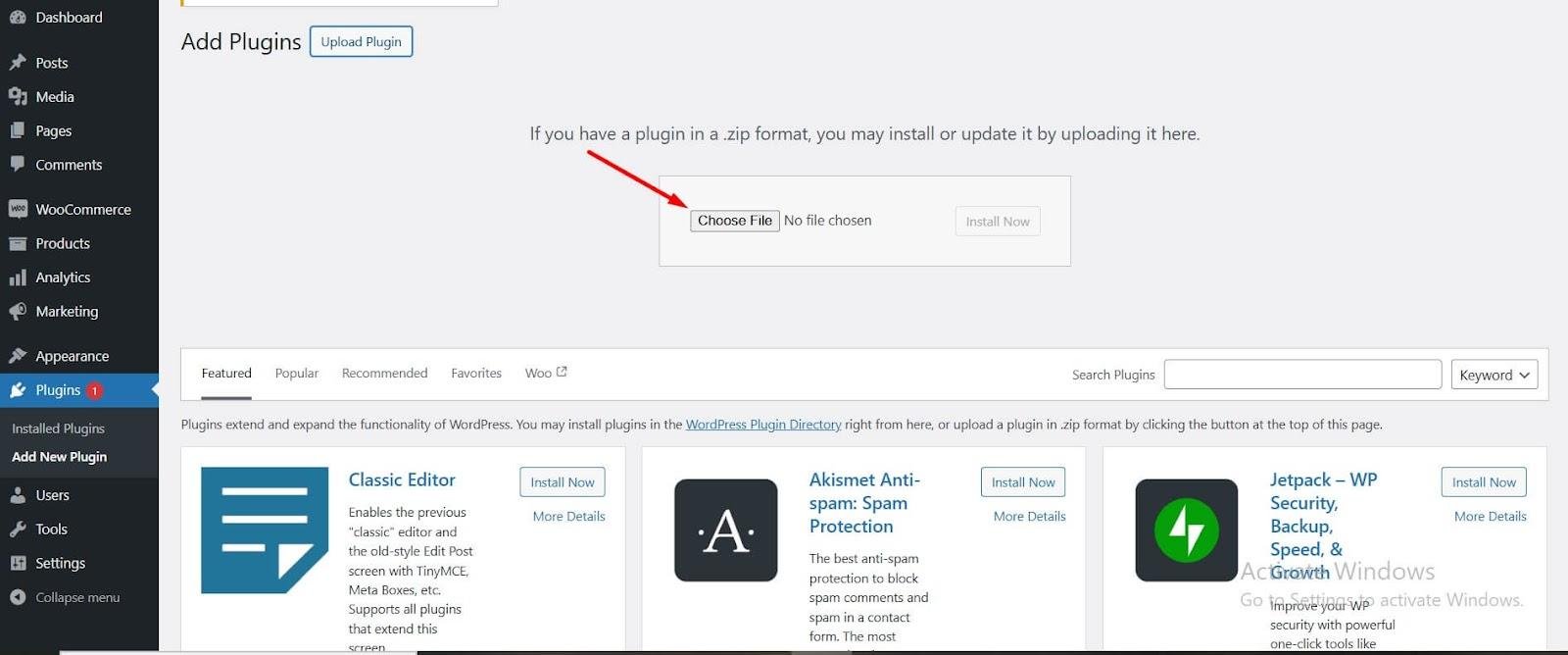
Press Install Now button to start the installation process.

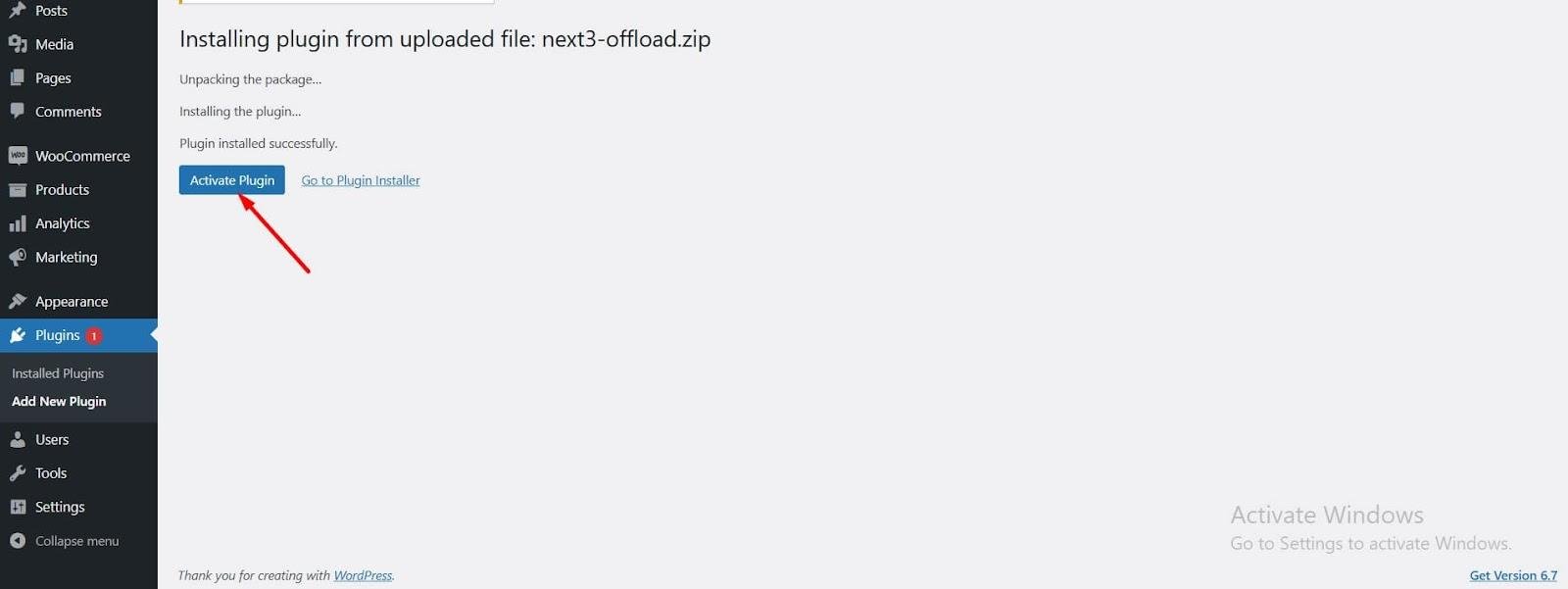
After installation, click to activate the Next3 Offload plugin on your WordPress site.
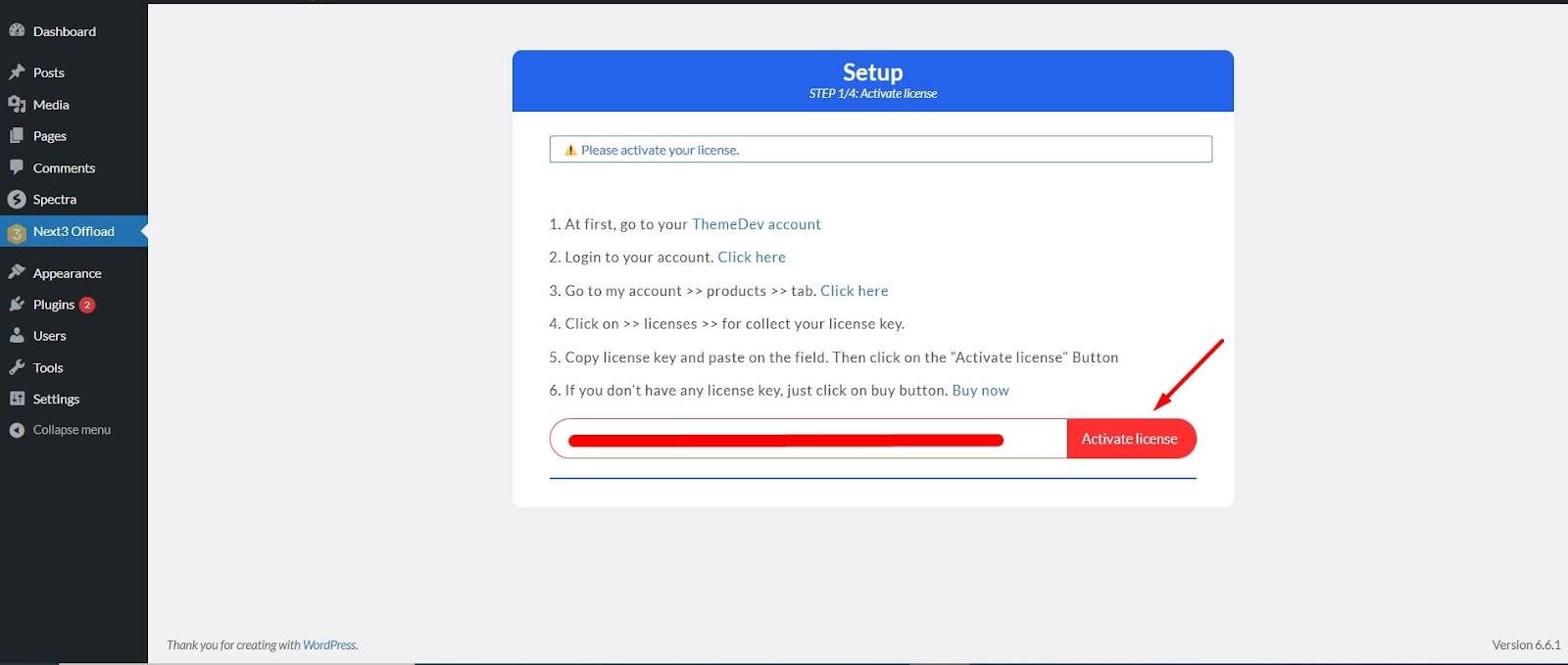
Enter your license key in the provided field. Then click on the Activate license button to activate the license.
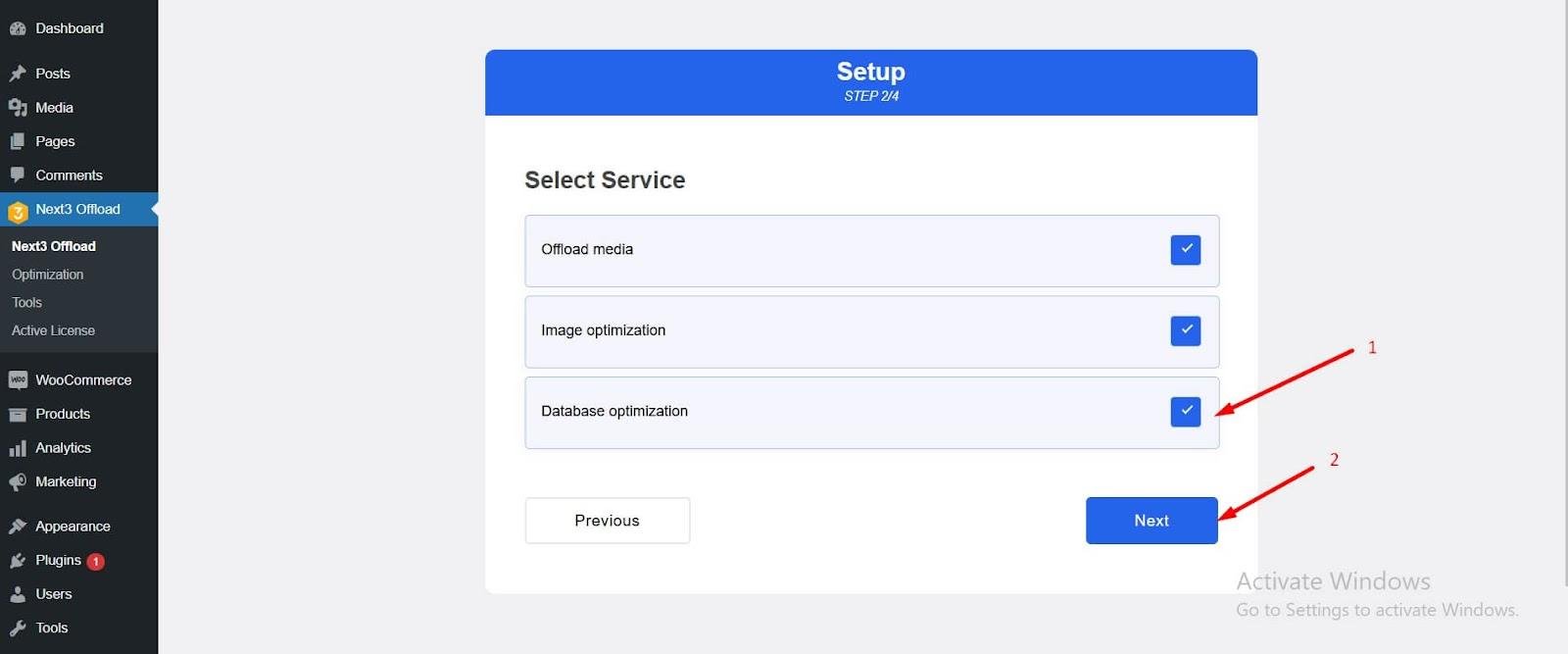
Now it’s time to select the service type you prefer. You can choose the one for database optimization only or all from the list if needed.
To connect with the provider, you need to select a provider and set up the credentials.
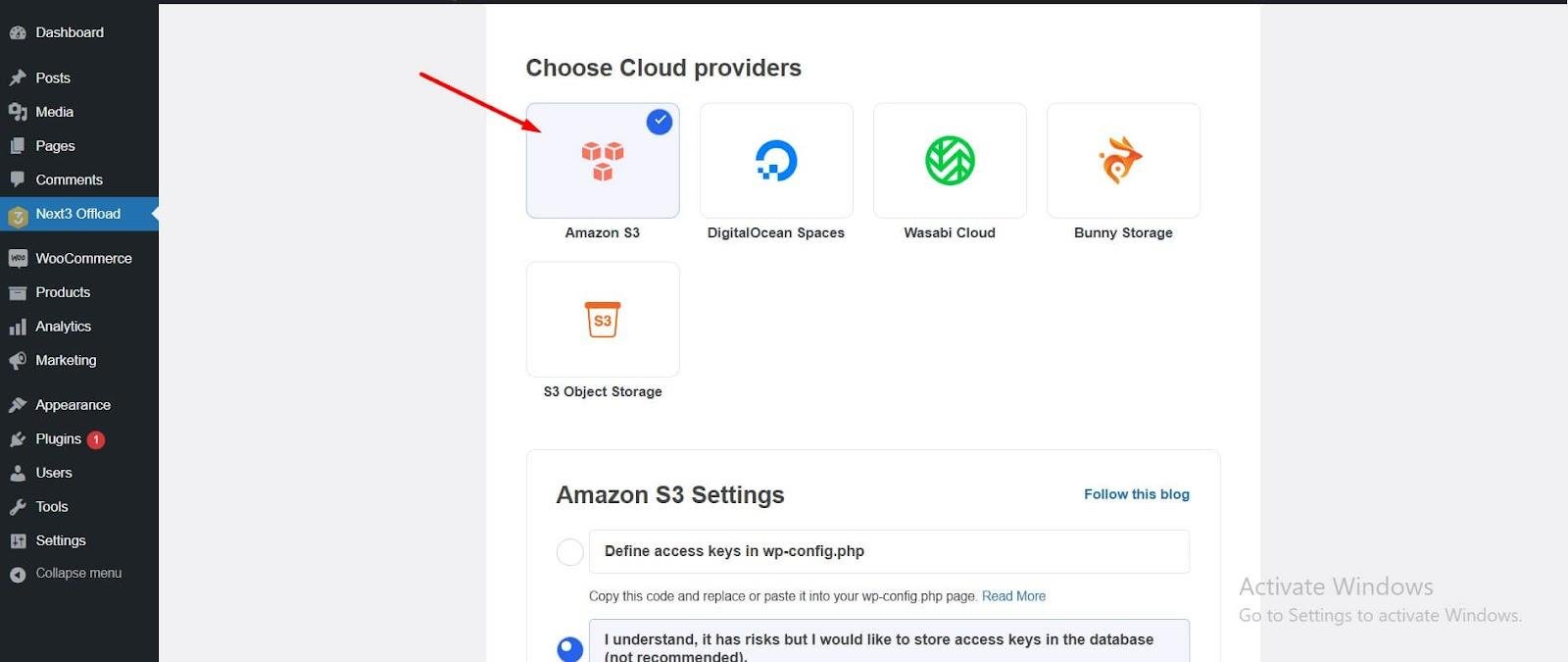
For more details about setting up providers and bucket-creation processes. You can follow the documentation of Next3 Offload.
Step 2: Enable Database Optimization Feature
After configuring the plugin, just click on the Next3 Offload tab to explore all its features.
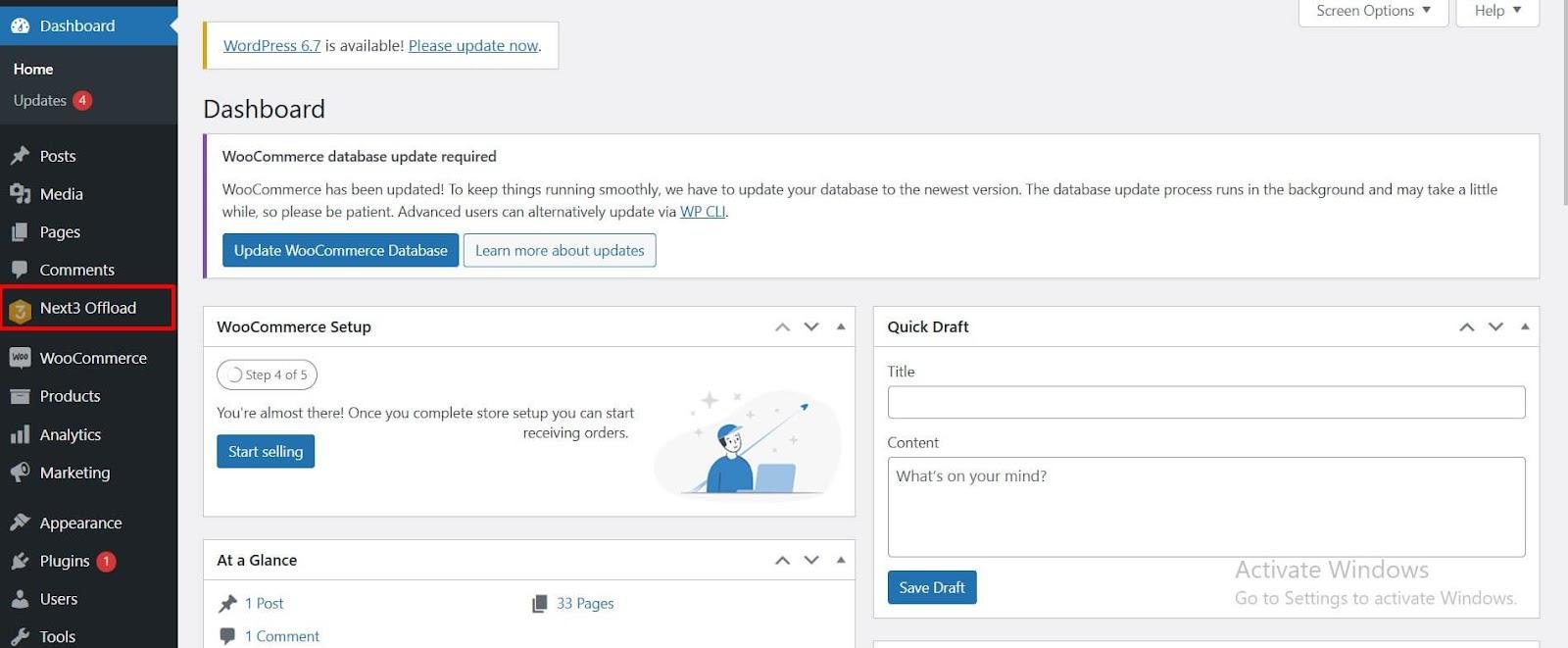
Step 3: Run the Database Optimization Process
To enable database optimization, go to the Next3 Offload tab > Optimization
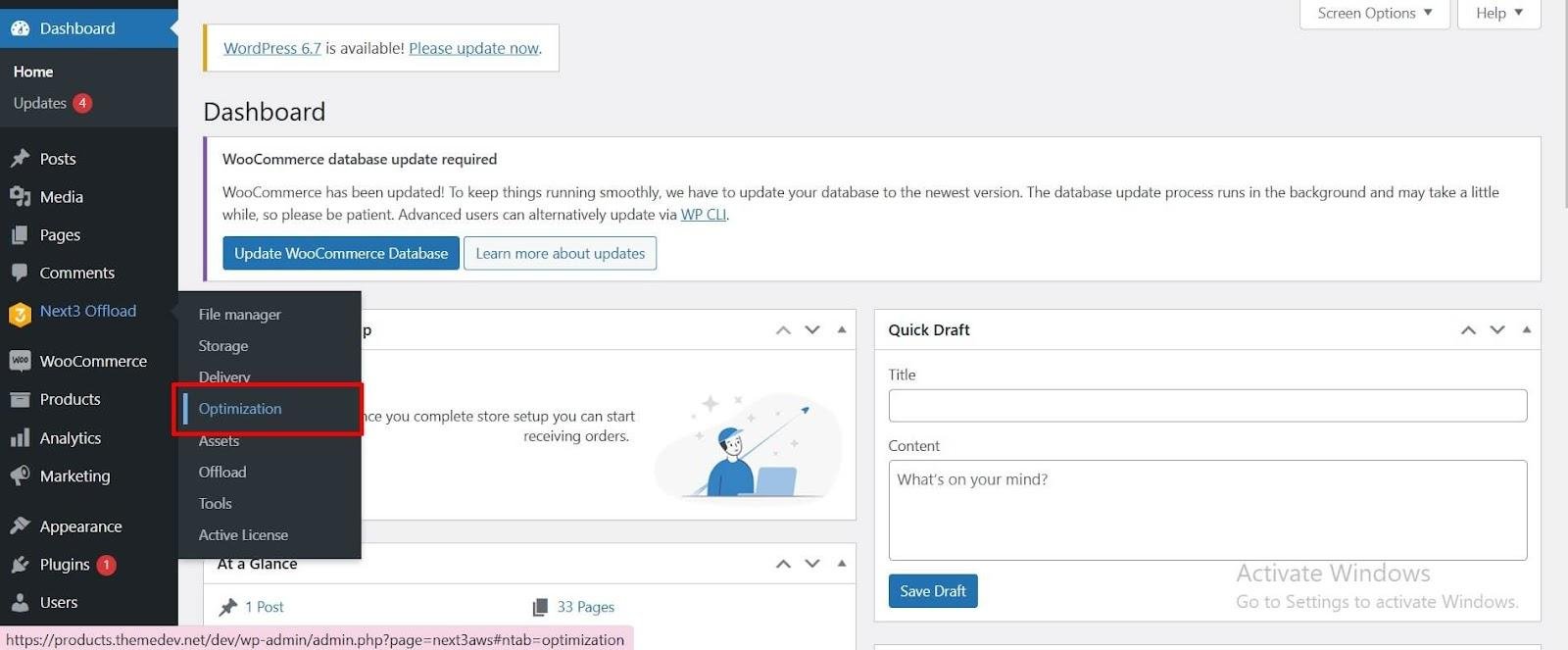
Here, you’ll see the database optimization option. Simply toggle the button to enable it and access the functionalities.
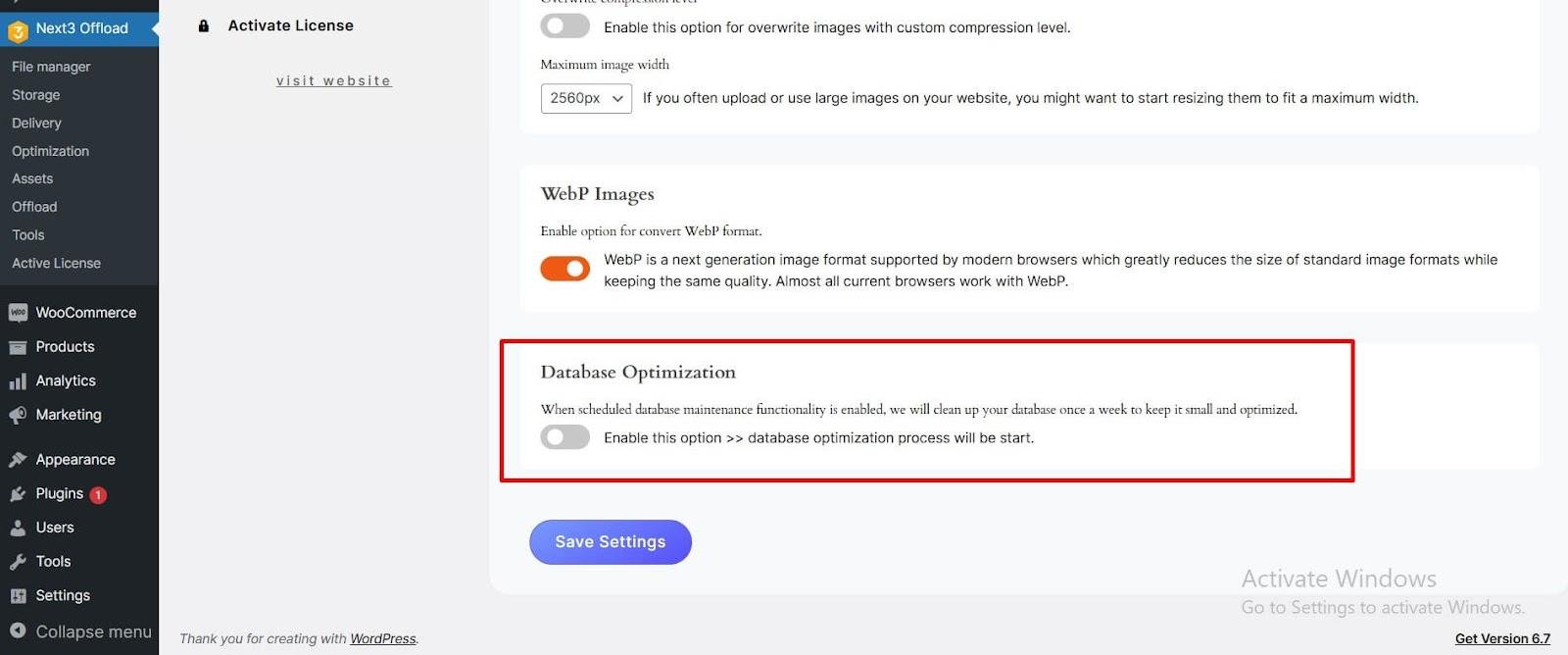
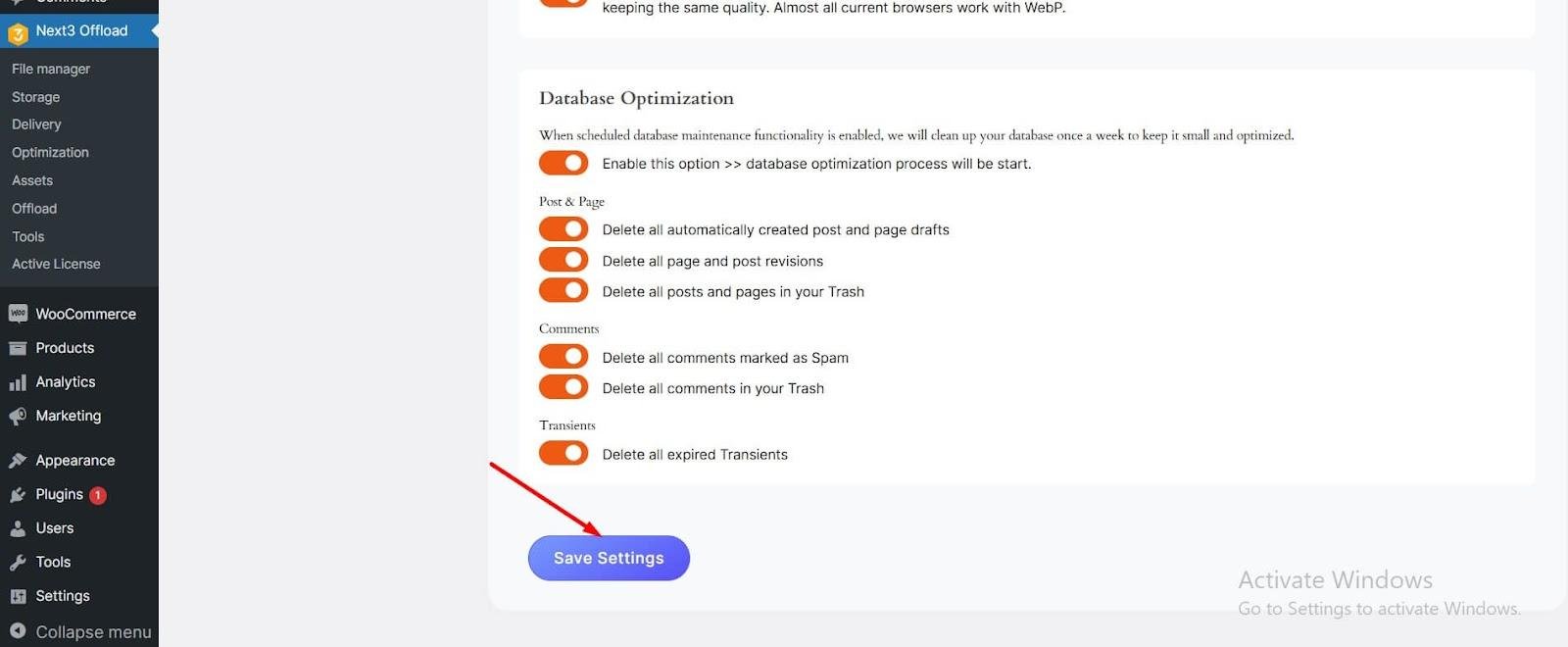
Simply toggle this option for database optimization.
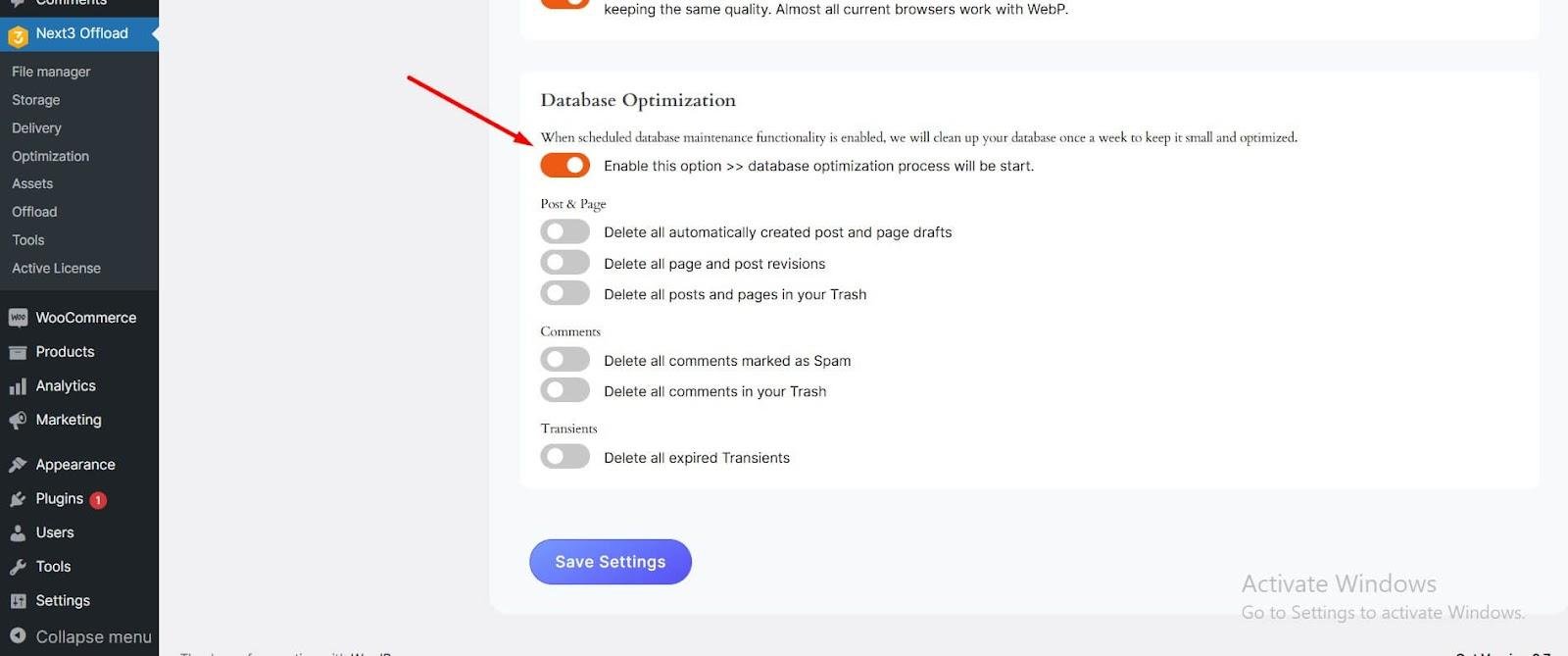
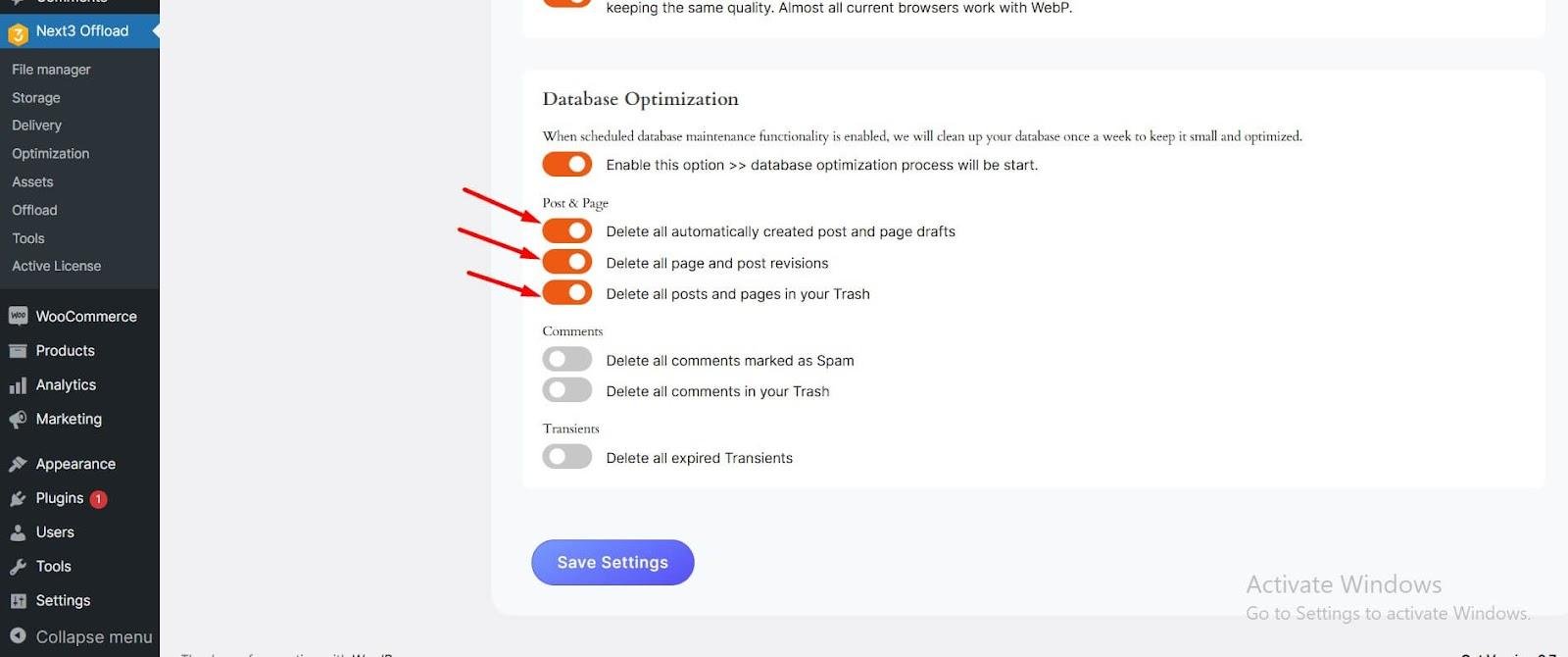
Toggle these three options below to remove auto-created drafts, trashed posts, and pages. These options help you clean up the pages and posts.
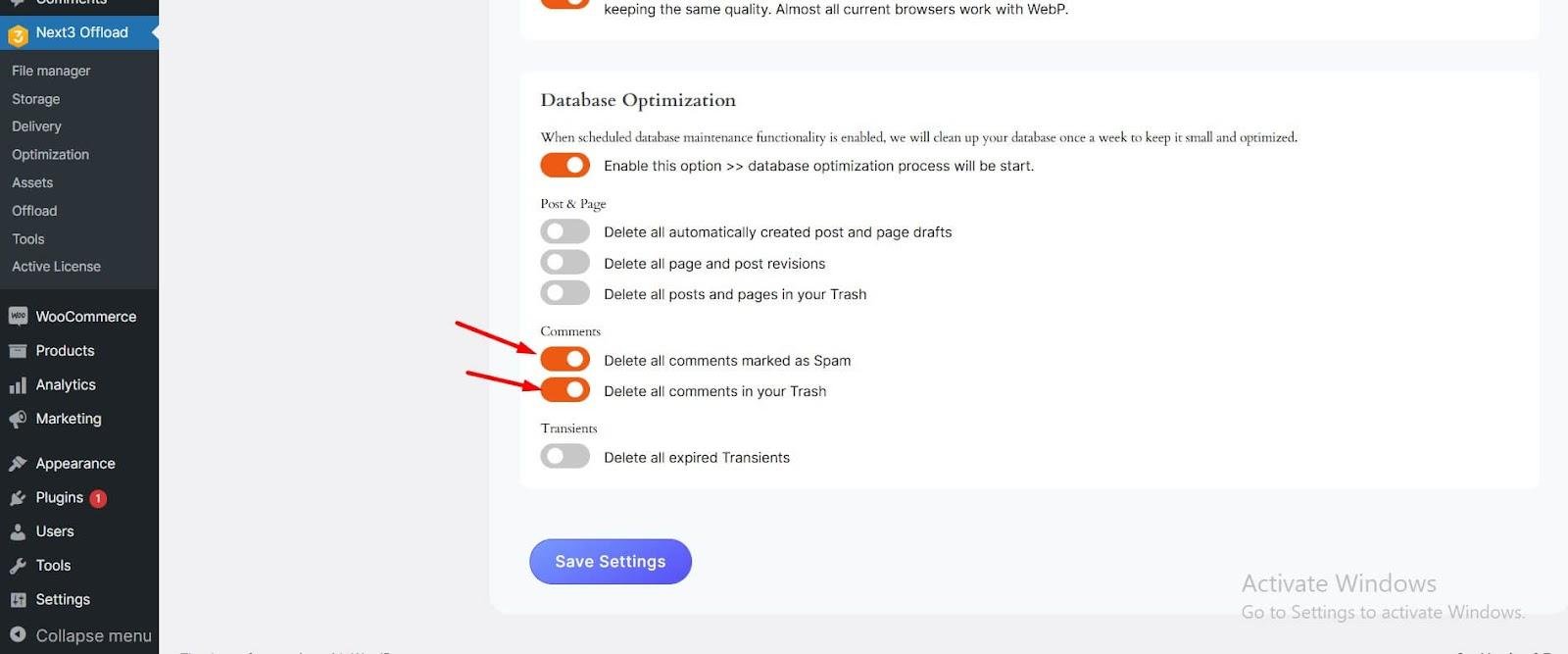
To keep your site spam-free, you need to toggle these two buttons to delete spam, and trashed comments.
Turn on the button to clear expired transients, free up space and improve performance.
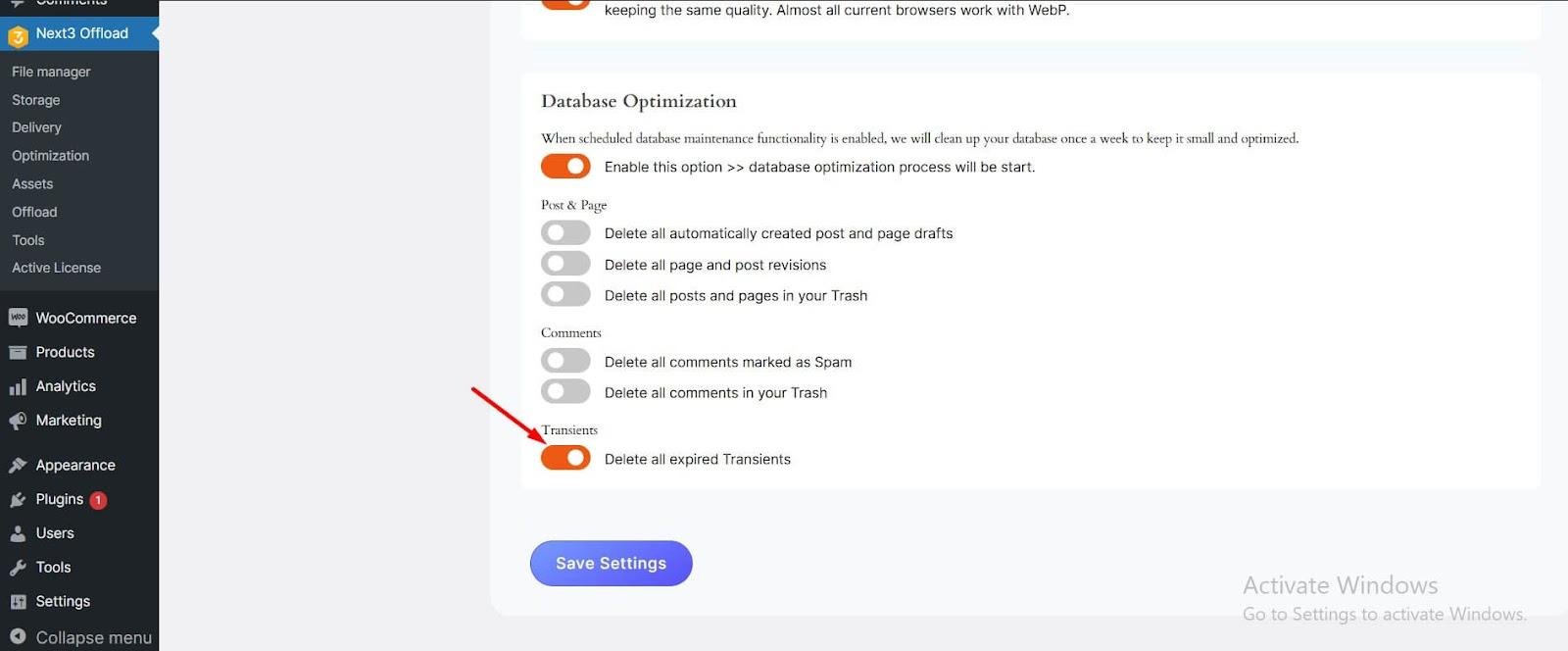
Don’t forget to click on the Save Changes button to save all your settings.
Supported Cloud Storage Services
Next3 Offload is compatible with popular CDNs, S3-Compatible Object Storages, and many cloud storage providers such as:
- Amazon S3 – Best for startups, enterprises, and government agencies
- DigitalOcean Spaces – Offers secure storage for developers, media, backups, and apps.
- BunnyCDN – offers a scalable, secure, and fast global content delivery network.
- Wasabi – An affordable, predictable, and secure cloud storage provider
- CloudFlare R2 – Protects websites to stop attacks, and hacking attempts.
- Vultr – Affordable hosting solution for people or corporations
- Scaleway – A reliable multi-AZ storage cloud provider
- MinIO – A high-performance S3-compatible object storage
And many more. Each storage provider offers unique benefits. It allows users to choose the best one based on their needs and budget.
Performance & Speed Improvement
The great features of Next3 Offload are performance and page loading speed improvement.
Impact on Page Load Time
Reduced Server Load: Offload WordPress media (images, videos, CSS, JS, etc.) to cloud storage, reduce server load time, and improve website performance.
Optimized Media Delivery: Integration with popular S3-compatible object storages and CDNs, image compression, and conversion to WebP format ensure faster delivery of media assets.
Enhanced User Experience: Faster load times allow visitors to stay on your website for a long time. It reduces bounce rate and increases higher engagement.
User Experience and Interface
Next3 Offload dashboard is clean and user-friendly.
It is super easy to set up and manage for both beginners and non-technical users. Through a few clicks, you can configure your cloud storage settings. You can easily start offloading media files to your preferred storage provider without any technical help from experts. This automatic offloading process saves time, boosts website performance, and handles everything in the background.
Security & Data Protection
You don’t have to worry about your data security. Next3 Offload integrates with the popular, reliable, secure, and safe storage providers to secure your data.
- Secure Cloud Integration: Ensures that all your media files are securely transferred to the cloud.
- Access Controls: Only authorized persons can view or modify your files.
Backup and Recovery Features:
- Automated Backups: No data loss at all.
- Easy Restoration: Instantly recover files whenever needed.
Next3 Offload Plugin: Use Cases
Next3 Offload is ideal for different types of websites, including:
- Best for Large Media Sites: Next3 Offload is perfect for photography or video-heavy websites. It helps reduce hosting costs and improves speed.
- Ideal for WooCommerce Stores: For WooCommerce Stores, large product images slow down your website. Next3 Offload helps improve your site performance, ensuring a faster shopping experience.
Pricing and Plans
Next3 Offload offers budget-friendly pricing plans. There are three types of pricing models, including personal, developer, and business. Each pricing plan has a specific number of sites and features for your needs. While there’s no free version of this plugin, the premium plans start at $89/year for the personal plan. Additionally, the plugin offers lifetime deals and lifetime support that provide long-term value for customer satisfaction.
Pros and Cons
Pros:
- Easy setup and integration with the cloud storage
- Supports multiple cloud storage providers (Amazon S3, Google Cloud, DigitalOcean).
- Improves website performance and server space
- Cost-effective for offloading media files
Cons:
- May incur additional cloud storage fees
- Requires a compatible cloud storage account
Customer Reviews & Testimonials
User Feedback
Many WordPress users praise Next3 Offload for its user-friendly interface and affordability.
What Users Are Saying:
⭐ “This plugin saved my website. Now my site is lightning fast!”
⭐ “Super easy to set up, it’s a powerful tool for WordPress media optimization.”
⭐ “great plugin, they are very active in updating, and fixing bugs.”
With positive reviews from the WordPress community, Next3 Offload is a trusted plugin for media offloading.
Troubleshooting & Support System
Common Issues
- Media Files Not Offloading? Check your API credentials and cloud storage connection.
- Broken Image URLs? No worries! Ensure that cloud URLs are correctly configured.
- Slow Cloud Performance? Integrate with S3-compatible object storage or CDN for better performance.
How to Get Help
- Official Documentation – Follow the step-by-step guides. ThemeDev also offers info blogs on WordPress and its products.
- Live Support – Get help from the live support chat.
- Premium Support – Open a support ticket from the ThemeDev support center.
Final Verdict on Next3 Offload
Next3 Offload is an all-in-one solution tool for website owners looking to improve performance.
Its robust features of image optimization, database optimization, WebP converter, Bulk image compression, and cloud integration with top providers make it beneficial for e-commerce sites, content-heavy websites, WordPress, bloggers, restaurants, e-commerce websites, video streaming sites, photography websites, news outlets, lifestyle blogs, web development agencies, and freelancers who manage client websites.










Comments
Congratulations, you have the opportunity to be the first commenter on this article.
Have a question or suggestion? Please leave a comment to start the discussion.